Paint Calculator
Unit System
What are the wall dimensions that you want to cover?
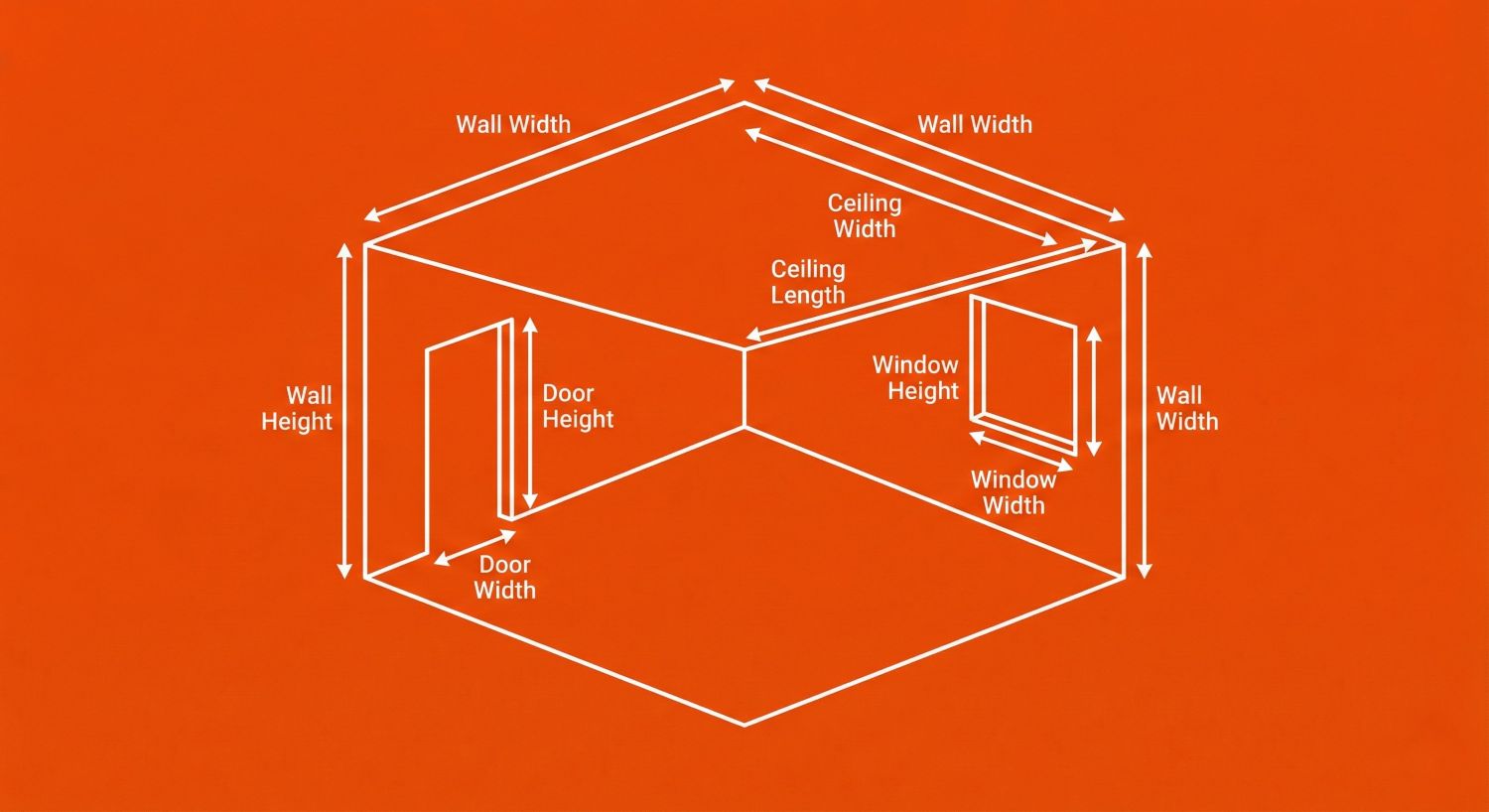
Diagram: wall height/width, door/window cutouts, and optional ceiling length/width.
What are dimensions of any areas you want to exclude and not cover?
Doors
Default door size: Standard door ~2.0 m × 0.9 m (6.6 ft × 3.0 ft). Leave empty if you don't have any doors to exclude.
Windows
Default window size: Standard window ~1.5 m × 1.2 m (4.9 ft × 3.9 ft). Leave empty if you don't have any windows to exclude.
How many coats of paint you want to apply to the area?
Coverage
Typical coverage: 10 m²/L (≈ 400 ft²/gal) for interior walls
We recommend purchasing at least 10% extra product to allow for errors, damages or obstacles
You're painting interior walls. Which sounds simple until you realize the "quick refresh" is actually a full-blown lifestyle choice.
Use this free Interior paint calculator (yes, a real calculator for paint) to estimate how much paint you need from your wall dimensions. Add multiple walls, exclude doors and windows, optionally include the ceiling, choose coats, set coverage, and add 10% extra so you don't run out halfway through your confidence.
No signup. No math meltdown. Just liters/gallons and the truth.
What This Calculator for Paint Does
This tool works as a:
- Wall paint calculator (multiple walls supported)
- Interior paint calculator (designed for indoor walls)
- Ceiling paint calculator (optional ceiling area included)
- Paint calculator m2 (Metric mode with m²/L coverage)
- Paint calculator square feet (Imperial mode with ft²/gal coverage)
What you get:
- Total wall area
- Doors/windows excluded
- Optional ceiling area included
- Coats applied (1–3)
- Coverage applied (default: 10 m²/L ≈ 400 ft²/gal)
- Optional 10% wastage
How to Use the Paint Calculator
- Choose your Unit System (Metric or Imperial)
- Enter your walls:
- Wall height and width
- Click Add another wall for more
- Exclude openings (optional):
- Doors (height × width)
- Windows (height × width)
- Optional: toggle Include ceiling and enter ceiling length × width
- Select coats (1, 2, or 3)
- Set coverage (keep default unless your paint can says otherwise)
- Enable 10% wastage (recommended)
- Calculate and pretend this is still "just a weekend project."
How Paint Calculation Works (Simple Formulas)
1) Wall area
For each wall:
Wall Area = Height × Width
2) Subtract doors and windows (optional)
Opening Area = Height × Width
Paintable area = Walls area − (Doors area + Windows area)
3) Add ceiling (optional)
Ceiling Area = Length × Width
4) Apply coats
Total Area With Coats = Paintable Area × Number of Coats
5) Convert area to paint amount using coverage
Paint Needed = Total Area With Coats ÷ Coverage
Metric mode: coverage in m²/L (your paint calculator m2)
Imperial mode: coverage in ft²/gal (your paint calculator square feet)
6) Add 10% wastage (optional)
Final Paint Needed = Paint Needed × 1.10
Results Explained
You'll see:
- Total wall area
- Total excluded area (doors + windows)
- Optional ceiling area
- Paintable area
- Paint needed (based on coats + coverage)
- Extra paint if wastage is enabled
Common Mistakes This Tool Prevents
- Buying paint without subtracting doors/windows (painting glass is a choice)
- Using 1 coat when 2 coats is clearly needed
- Ignoring the coverage rate on the can
- Skipping wastage and doing an emergency store run mid-project
- Mixing up units (cm vs m, in vs ft) and accidentally painting a warehouse
Frequently Asked Questions
Is this a calculator for paint in liters and gallons?
Yes. Use Metric for m/cm and m²/L, or Imperial for ft/in and ft²/gal.
How do I calculate interior wall paint?
Add wall areas (height × width), subtract doors/windows, multiply by coats, then divide by coverage. This wall paint calculator does it instantly.
Can I use this as a ceiling paint calculator?
Yes. Toggle "Include ceiling" and enter ceiling length × width. The calculator adds ceiling area to your total.
What is a typical coverage for interior paint?
A common planning number is about 10 m²/L (around 400 ft²/gal), but always check your paint can and enter the real value.
What does "paint calculator square feet" mean?
It means you're calculating paint using Imperial units, where area is in square feet and coverage is often listed as ft² per gallon.
What does "paint calculator m2" mean?
It means you're calculating paint in Metric units, where area is in m² and coverage is often listed as m² per liter.
How many coats should I use?
Most interior walls look best with 2 coats. One coat is a gamble. Three coats is commitment.
Should I add 10% wastage?
If you want enough paint, yes. Wastage covers spills, touch-ups, roller loading, and "why is this wall still not done?"
Mini Roast Disclaimer
We roast the numbers, not you. But if you type "Wall height: 0" and "Wall width: 0," you're not painting a wall — you're painting your hopes.
Reality Check (Not Professional Advice)
Estimates only. Not professional painting, engineering, or safety advice. Coverage depends on paint type, surface condition, and how aggressively you roll like you're personally offended by the wall.
Manual & Documentation
Paint calculator results are calculated using standard paint coverage formulas based on wall dimensions, doors/windows exclusions, optional ceiling area, number of coats, coverage rate, and optional wastage. Estimates only — not professional painting advice.