Concrete Calculator
Concrete Types
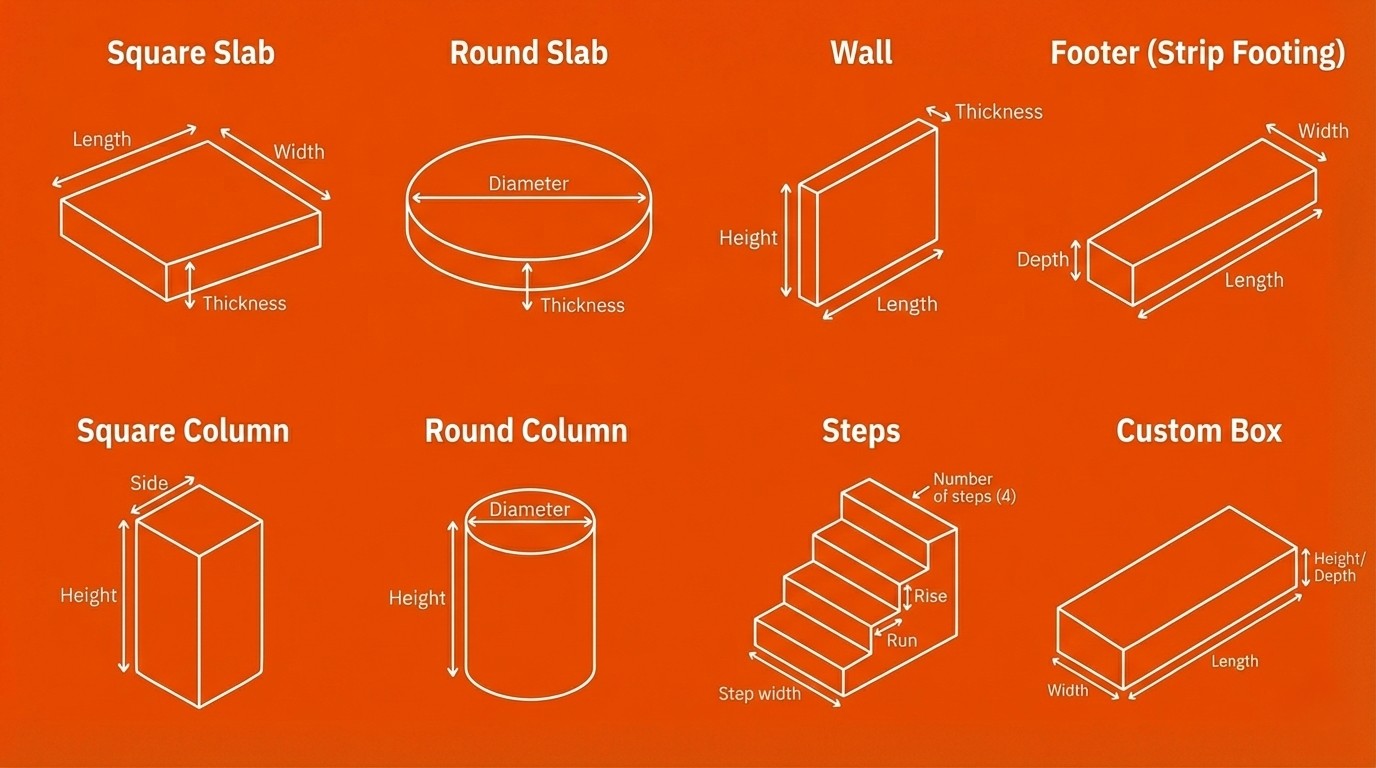
Concrete Shape
Select the shape of your concrete project
Options
Number of identical structures (e.g., 50 round columns)
Add extra concrete for waste, spillage, and over-excavation. Default: 10%
Concrete Calculator
You’re about to pour concrete. Which means you’re either building something useful… or making a very expensive rock on purpose.
Use this free Concrete Calculator to estimate concrete volume fast—by shape (slab, wall, footing, columns, steps, or custom box). Enter your dimensions, choose Metric (m/cm) or Imperial (ft/in), add waste %, and optionally calculate bags and cost.
No signup. No fluff. Just numbers, cubic yards, and the truth.
What This Concrete Calculator Does
This tool works as:
- A concrete volume calculator (m³, ft³, yd³)
- A concrete yard calculator (a.k.a. “how many yards of concrete do I need”)
- A concrete estimator for different project shapes (slab, wall, footing, columns, steps, custom box)
- A concrete cost calculator (optional price per cubic yard / cubic meter / cubic foot)
- A concrete mix calculator helper (by converting volume into bags, if you pick a bag size)
If you came for "concrete calc" energy: yes. Same thing. Just fewer mistakes.
Looking for other construction tools? Cool. Because one project is never enough.
Try the Square Feet Calculator for area math, the Tile Calculator for flooring regrets, or the Fence Calculator for perimeter planning (aka "how to spend your weekend").
Or browse all Construction & Home Improvement calculators and pretend this is "fun."
Concrete Shapes Supported
Pick the shape of your concrete project, then enter dimensions:
- Square Slab (length × width × thickness) → classic concrete slab calculator
- Round Slab (diameter × thickness)
- Wall (length × height × thickness)
- Footer / Strip Footing (length × width × depth) → also a concrete footing calculator
- Square Column (side × side × height)
- Round Column (diameter × height)
- Steps (width × rise × run × number of steps)
- Custom Rectangular Box (length × width × height)
Yes, you can set Quantity too (because building 50 columns is a thing some people do for fun).
How to Calculate Concrete (The Simple Math)
Rectangular shapes (slabs, walls, footings, boxes)
Volume = Length × Width × Depth
Cylindrical shapes (round slabs / round columns)
Volume = π × (Diameter ÷ 2)² × Height
Then this calculator converts volume into:
- cubic meters (m³)
- cubic feet (ft³)
- cubic yards (yd³)
And if you enable it:
- Waste %: Volume × (1 + waste/100)
- Bags: total ft³ ÷ bag yield (rounded up)
- Cost: volume × price per yd³ (or chosen unit)
Same formulas. Different levels of panic.
How to Use the Calculator
- Choose Unit System: Metric (m/cm) or Imperial (ft/in)
- Select a Concrete Shape (e.g., Wall, Slab, Footing)
- Enter Dimensions (and thickness/depth where needed)
- Set Quantity if you’re repeating the same structure
- Keep Waste Percentage at 10% (default) unless you enjoy running out
- Optional:
- Enable Calculate Bags and pick a bag size
- Enable Cost Calculation and enter a price per cubic unit (like yd³)
Click Calculate Concrete and get your volume (already including your waste % if you set one).
Results Explained
You’ll typically see:
- Concrete Volume (m³ / ft³ / yd³) — includes your waste %
- Bag estimate (optional) — how many bags you’ll carry while questioning your life
- Concrete cost estimate (optional) — based on your price per cubic unit
Tip: Ready-mix suppliers usually speak yd³. If you’re mixing bags, your back will translate it for you.
Common Mistakes This Tool Prevents
- Mixing up cm and m (the classic “why is my slab the size of a swimming pool?”)
- Forgetting thickness/depth (aka “2D concrete”, very modern, very useless)
- Ignoring waste/spillage (then buying more later with pure rage)
- Ordering based on ft³ when the supplier wants yd³
- Rounding down (congrats, you invented a second trip)
Frequently Asked Questions
How do I estimate concrete yards?
Calculate volume (based on shape), convert to cubic yards, then add waste. This concrete calculator does it instantly, including yd³ output and waste %.
What is a concrete slab calculator?
A concrete slab calculator estimates volume for a slab using length × width × thickness, then converts to yd³/m³/ft³. Use the Square Slab or Round Slab shape.
Is this a concrete cost calculator?
Yes—enable Optional Cost Calculation and enter a price per cubic unit (commonly per yd³), and you’ll get a cost estimate.
What’s the difference between a concrete estimator and a concrete volume calculator?
A concrete volume calculator gives volume; a concrete estimator usually includes waste, bags, and/or cost. This tool does both.
How to estimate concrete yards for a wall?
Use Wall: enter length, height, thickness, quantity, and waste %. The calculator outputs yd³.
Can this calculate concrete for footings?
Yes. Use Footer (strip footing)—same thing, less guesswork.
Why add 10% waste?
Because concrete spills, over-excavation happens, and measuring isn’t a superpower. 10% is a common planning buffer. If your site is messy, consider more.
I searched “concrete calculater / concrete calulator” — is this still it?
Yes. Spelling is hard. Concrete is harder. This online concrete calculator still works.
Mini Roast Disclaimer
We roast the numbers, not you. But if you set thickness to 0 cm, you’re not pouring concrete — you’re drawing it.
Reality Check (Not Engineering Advice)
Estimates only. Not Engineering Advice: Not engineering, legal, or safety advice. Local codes, soil conditions, reinforcement needs, and real-world constraints can change everything. If the project matters (or could hurt someone), consult a qualified professional.
Manual & Documentation
Concrete estimates are approximations for planning purposes. Educational & entertainment only — not engineering advice.
Generated for educational and entertainment purposes.